August 16, 2026
Building Overcut series →Building Overcut 002: Adding a HUD and Tuning the Car
TL;DR - Overcut now has a complete driving HUD, lap and sector timing, visible inputs and tire cues, and a faster prototype handling setup. It is still a rough vehicle test, but more of the pieces I expect from a racing game are now on screen. Sound and 3D art are also teaching me that AI can help me explore an unfamiliar discipline, but it cannot remove the need to learn the craft.
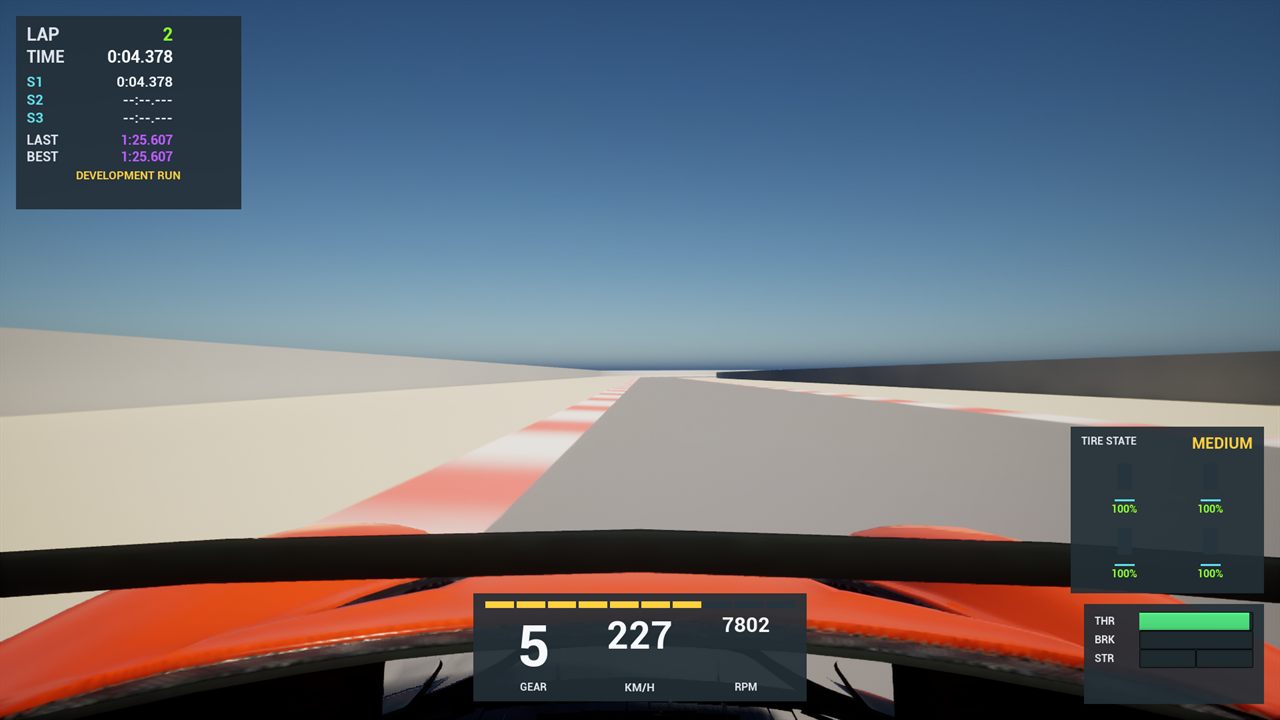
Bridgeway Straight with the complete driving HUD visible. The orange car is still Epic’s placeholder vehicle.
More pieces are starting to connect
In the first Building Overcut update, getting a car around the circuit was the accomplishment. The track was a graybox, the vehicle was a placeholder, and the automated driver occasionally finished its assignment by wandering off into the scenery.
This week I sat down with a controller, drove several clean laps, and started paying attention to sector deltas, shift lights, wheelspin, and braking points.
That sounds like a small difference. It did not feel small.
The visuals are still rough. The sound is still temporary. I am not about to pretend I accidentally finished a racing game over the weekend. But the prototype now gives me the information I expect when I am driving, and the car is fast enough to make that information matter.
Milestone 1 now stands at 17 of 21 issues closed. The number is useful, but the more meaningful update is that more of the driving systems are working together underneath the unfinished art.
The HUD makes the prototype easier to read
The timing overlay from last week answered one question: did the car complete a lap?
The new HUD answers a much better one: what is the car doing while I am trying to drive it?
| Part of the HUD | What it tells me |
|---|---|
| Lap and sector timing | Current lap, sector splits, last lap, best lap, and whether I am gaining or losing time |
| Dashboard | Gear, speed, RPM, and when it is time to shift |
| Driving inputs | How much throttle, brake, and steering the controller is actually sending |
| Tire state | Which tire is slipping, how much it is slipping, the direction of that slip, and the current compound |
Some of this may stay as development UI. Some of it will probably become part of the final player experience. I do not need to decide all of that yet.
Right now, it helps me connect what I feel through the controller with what the simulation is doing. If the rear tires light up on corner exit, I can see the wheelspin. If the car starts sliding sideways, the tire display shows the direction. If steering feels nervous at speed, the input bar tells me whether the problem starts with my thumb or with the car.
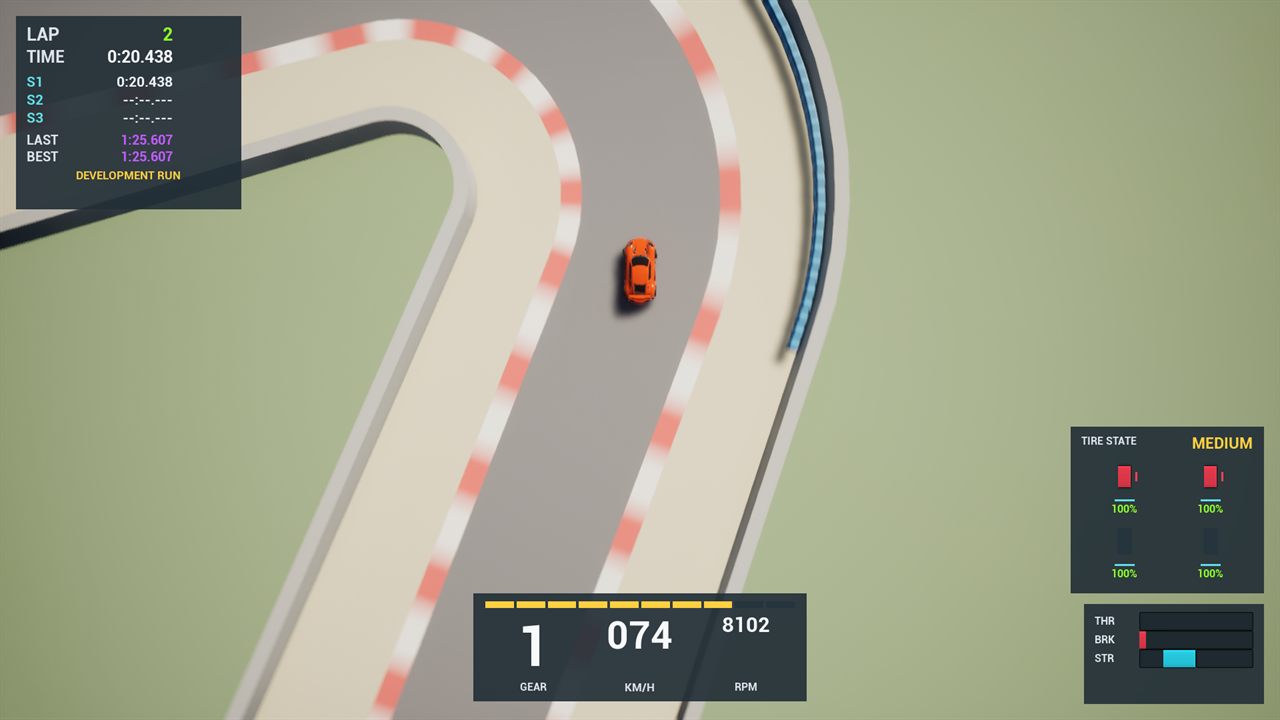
The fixed overhead journal view at the Alder Hairpin. The tire display shows what the car is doing while it is loaded in the corner.
That feedback made the whole build feel more coherent. The timing, controls, tires, and dashboard are no longer separate systems hiding in logs. They are one picture I can read while driving.
The car had to catch up with the interface
A better dashboard would not have helped much if the car still felt like the original sports-car scaffold.
The current setup is the first pass at Overcut’s unrestricted prototype: lighter, much more powerful, supported by passive downforce, and using six useful gears. The controls are direct instead of hiding mistakes behind driving assists. Steering sensitivity falls as speed rises so a tiny stick movement at the end of a long straight does not become an immediate trip through the nearest wall.
I described it in the video as something closer to an F1 car. I do not mean the physics are a finished Formula 1 simulation. I mean it finally has that high-performance prototype energy: quick acceleration, strong braking, and enough grip to make carrying speed through a corner interesting.
Making the car faster also exposed problems that the slower setup had been politely driving around.
Highfield is a fast uphill section of Aldermoor. As the car gained performance, it started bouncing and vibrating there. The handling was not the only problem. The road collision was built from diagonal faces that the suspension could feel at speed.
Splitting that surface into eight collision strips reduced the measured suspension movement through Highfield by 81 percent. That is a very game-development sentence. I tuned the car, the car found a track problem, and fixing the track made the car easier to tune.
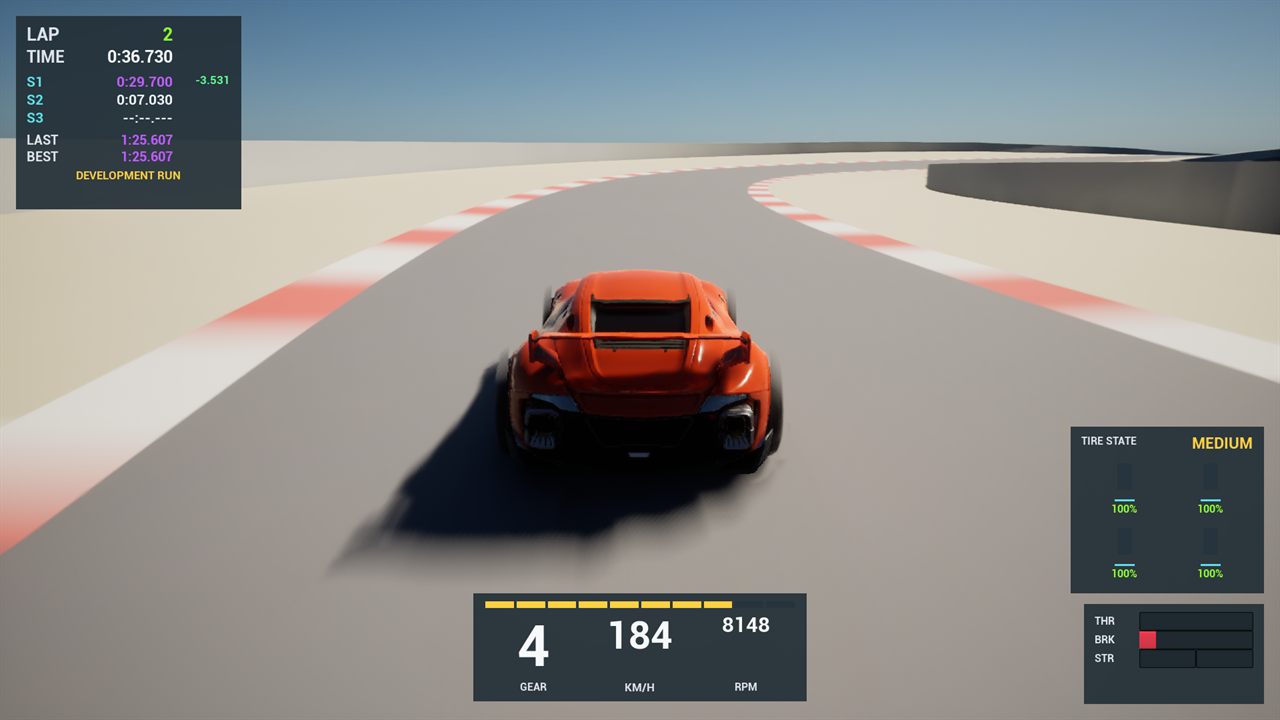
The weekly chase view through Highfield after the road collision and controller passes.
The accepted controller run finished three clean laps. By the end, I was fighting rear wheelspin instead of fighting broken input routing or a road that shook the car.
That is the kind of problem I wanted to have.
Sound was supposed to be the easy part
I went into the week assuming sound would mostly be a marketplace problem.
Find a good pack on Fab, check the license, pay for it if needed, and drop the files into the game. Done.
It turns out that sound I trust, can legally use, and actually like is either expensive or still needs real editing. I tried taking some free source material and shaping it myself. It did not go well.
Overcut still uses synthesized engine, tire, and shift sounds as placeholders. They are useful because they react to the car and give me something to test, but they are not the sound of the finished game.
The good news is that I am more interested in learning audio now than I was before I discovered how hard it is. Apparently my response to finding another deep discipline is to add it to the list.
The art agent worked, which created a different problem
I also built an art workflow that can take a prompt, try several image-generation paths, compare the candidates, and send a promising result into Tripo for an image-to-3D pass. Some image models run locally. Others are hosted in Azure. The workflow checks its output, attempts refinements, and comes back to me when it needs a decision.
The results are not bad.
They are also not finished game assets.
Getting from “that looks like the object I described” to “I would put that in front of a player” still needs judgment and manual work. I need to understand how to clean up a model in Blender, adjust the parts that look wrong, and make sure the result belongs in the same world as everything around it.
The workflow did not convince me that I can skip learning 3D art. It did the opposite. It got me close enough to see what I do not know.
That has changed what I want from AI on this project. I still want it to help me explore options and automate repeatable steps. I also want to understand more of the process myself, including making some things from scratch instead of treating every unfamiliar skill as a prompt-shaped hole.
The same rule from the Overcut announcement still applies: Overcut will not be monetized while AI-generated artwork remains in the game or its presentation.
The number of disciplines is the hard part
This week touched vehicle physics, controller tuning, track collision, UI, telemetry, sound editing, image generation, and 3D modeling.
That is what makes solo game development difficult. It is also what makes it fascinating.
I can spend one evening tuning how steering authority changes with speed, then discover the next night that I need to understand audio loops or why a generated mesh looks strange from the back. Every system connects to another system, and the game makes the gaps obvious as soon as I try to play it.
GitHub Copilot helps me move between those areas. It can research a pattern, implement a tool, compare evidence, and keep a long workflow moving. What it cannot do is make every result good just because the pipeline completed.
That part still needs taste, practice, and a person willing to say, “No, that is not right yet.”
Tools and resources
| Resource | How it fits this update |
|---|---|
| Overcut | The game concept and current visual direction |
| Unreal Engine 5.8 documentation | The engine behind the driving prototype, HUD, and track |
| GitHub Copilot documentation | The agents and coding tools used across the project |
| Fab documentation | Epic’s marketplace for game-ready assets and audio |
| Blender manual | The 3D modeling and cleanup skills I am starting to learn |
| Tripo | The image-to-3D service used in the experimental art workflow |
| Azure OpenAI image generation | One of the hosted image-generation paths available to the workflow |
Closing thought
Last week the car could finish laps. This week I could read the lap while I was driving it.
The next gaps are not only code. I need to learn how this game should sound and how to shape the objects that will fill its world. That is more work than I expected.
It is also why I cannot stop thinking about it.