April 15, 2026
How My Workflow Actually Changed
TL;DR — Since around January 2026, I’ve basically stopped writing code by hand. Instead I work in a loop: Research → Plan → Execute → Nudge → Review, all driven by AI agents in GitHub Copilot CLI. This post walks through that cycle, how it maps to real tools, and what it actually feels like day-to-day — including the parts that aren’t all sunshine and rainbows.
Something Definitely Shifted
Sometime around January this year, the way I work as a developer just… clicked into a different gear and fundementally shifted (racing pun intended). The frontier models got significantly better (Opus, GPT-5.4, and friends), and the tooling around them matured enough that something radically changed in my day-to-day workflow — not gradually, but noticeably.
I’m an IC developer at Microsoft. The folks around me experienced the same shift. We talk about it a lot. And while there are plenty of hot takes flying around, I just want to share what this actually looks like from my desk. No hype, no doom — just what changed and how it feels from my personal perspective.
The Old Way
Up until maybe December, my workflow looked like what most developers would recognize. I’d create a branch (or a worktree — I was already hooked on those), open VS Code, and start editing files. I’d have the Copilot chat sidebar open, maybe ask it questions, sometimes move it into the editor panel to give it more room. But fundamentally, I was looking at code and writing code.
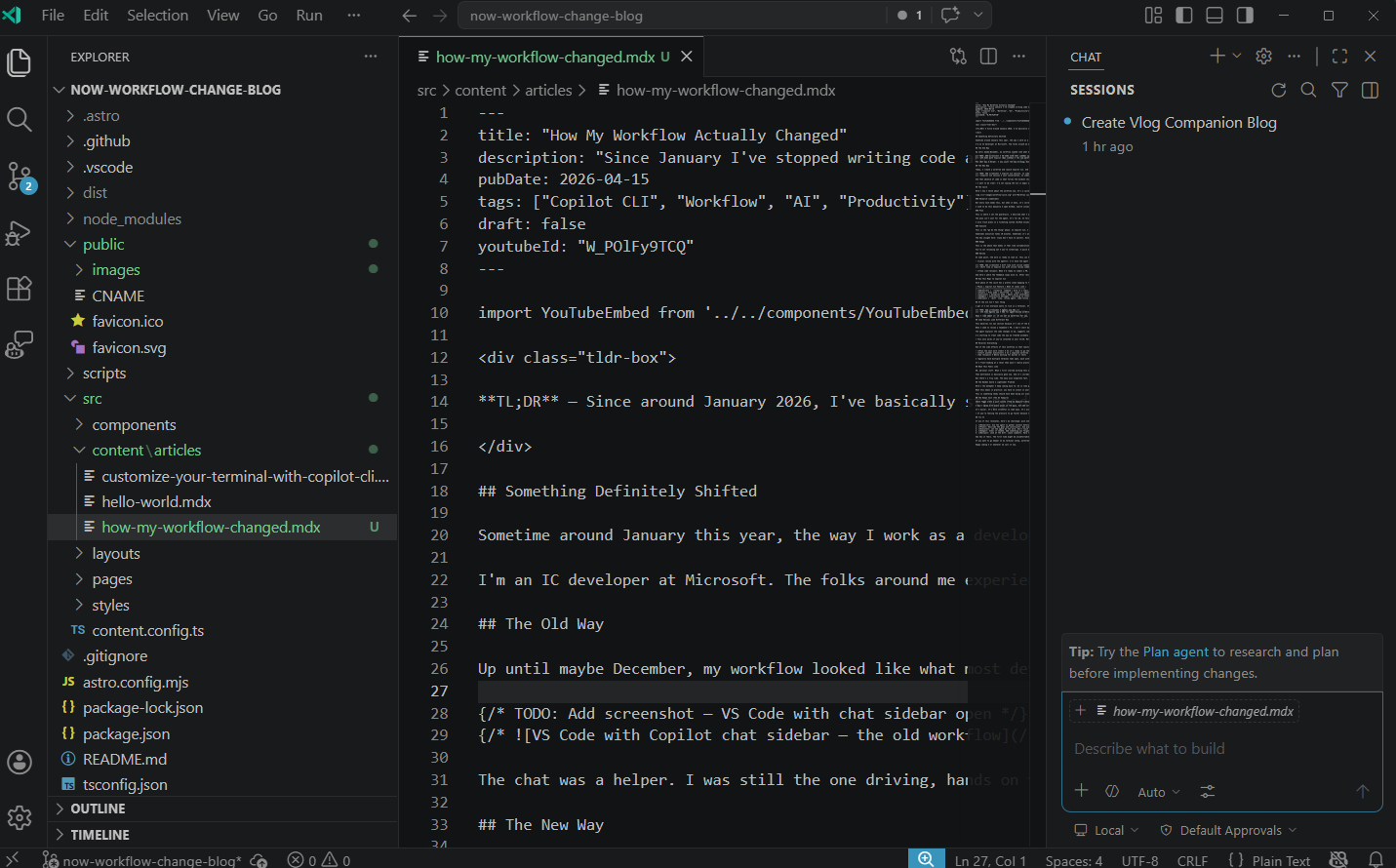
The chat was a helper. I was still the one driving, hands on the keyboard, files open, making changes in the code.
The New Way
Today, I create a worktree and launch Copilot CLI. And here’s the thing that makes it click: there’s no code. There’s nothing to look at. No files open, no editor, no syntax highlighting. Just a conversation.
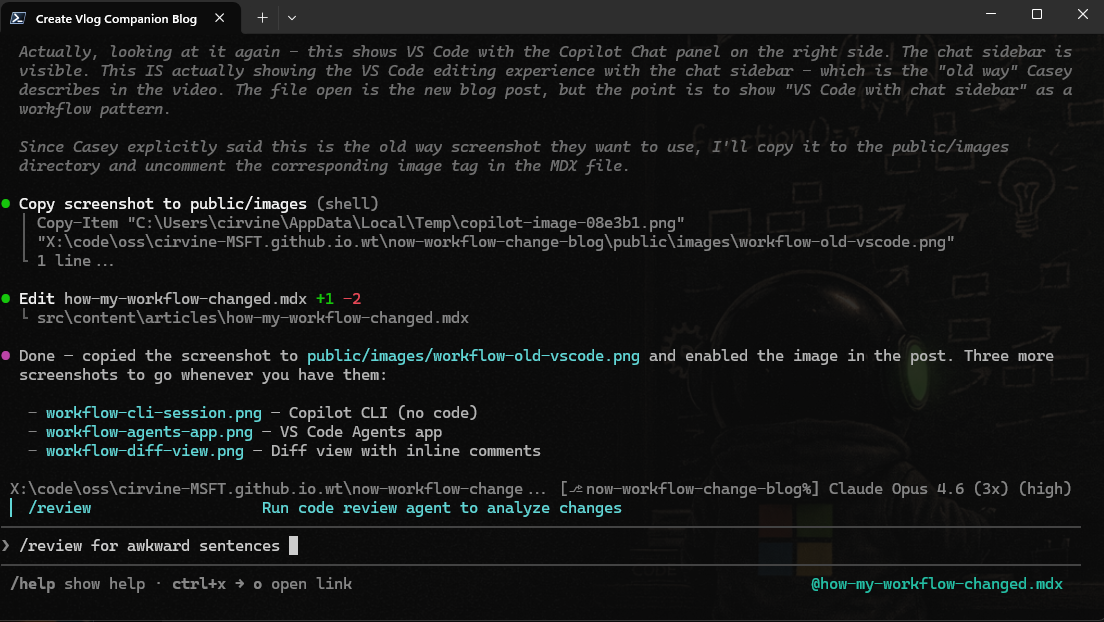
And that absence of code is what forces the mindset shift. You can’t fall back into the habit of hand-editing a file because there are no files in front of you. You have to talk to the agent. You have to describe what you want, set constraints, explain your intent. You’re not coding — you’re directing.
I want to be clear: I’m not saying the CLI is magic and VS Code is dead. The CLI is just what unlocked the mental model for me. Once you internalize the “talk first, code never” approach, you can use it anywhere — VS Code, the Agents app, whatever. The CLI just happens to remove the temptation to reach for the code editor.
I still care deeply about code quality. Modularity, naming, structure, how things fit together. That stuff still matters to me. I just pursue it through conversation now instead of manual edits. I tell the agent what I care about, and it’s part of how I frame every task.
The Cycle
Here’s how I think about the workflow now. It’s a cycle with five phases, and you loop through them until you hit your goal.
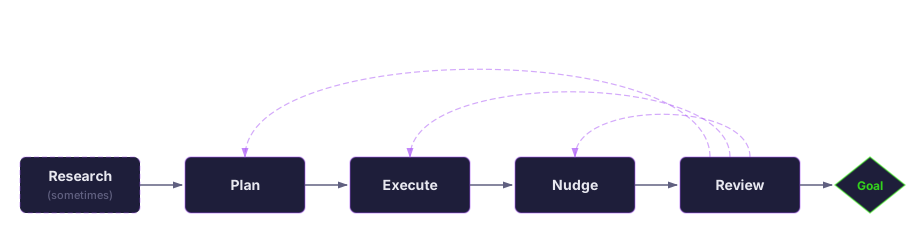
Research (sometimes)
Not every task needs this, but when it does, it’s incredibly useful. Before I even think about what to build, I’ll have the agent go gather context. Maybe it’s reading through docs or repos to get context on the problem space or existing technologies/solutions.
I used to do this manually — open GitHub, search issues, read READMEs, skim through source files, or god forbid talk to another human being.
Plan
This is where I set the guardrails. I describe what I want the end result to look like — the goal, the constraints, what “done” means. In Copilot CLI, I use plan mode (Shift+Tab or /plan) to have the agent create a structured plan before it touches anything.
The plan isn’t just for the agent. It’s for me. It forces me to think about exit criteria before execution starts. What tests need to pass? What behavior should change? What files are in scope? If I can’t articulate the goal clearly, I’m not ready to execute — and the plan phase makes that obvious.
I also track plans in a ticketing system (GitHub Issues or ADO work items). This gives my agents a breadcrumb back to the original plan and a place to track status. Often other teammates’ agents will find these updates and use those to inform teammates’ what I’m working on and where there might be overlap. I don’t update these tickets by hand, Copilot does it all for me.
Execute
This is the “go do the thing” phase. In Copilot CLI, I think of this as autopilot mode. I give the agent the plan, approve the tools it needs, and let it work.
Sometimes execution takes 10 minutes. Sometimes it’s an hour. The agent might be writing code, running tests, standing up Azure resources, kicking off cloud builds — whatever the plan calls for. I have extensions that watch builds for me, so the agent can wait for a long-running CI pipeline and wake up when it finishes.
The key insight here: you don’t have to watch. Once execution starts, you can go do something else. Plan another work item. Review someone else’s PR. Grab coffee. The agent will be there when you get back.
Nudge
This is the phase that makes it feel like collaboration instead of one-shotting everything. Maybe the agent finishes a chunk of work and you think of something you forgot to mention. Maybe you see it going slightly off track and want to course-correct. Maybe you just want to add one more thing to the scope.
You’re not reviewing yet — you’re steering. A quick message like “oh, can you also handle the error case for X” or “actually, let’s use the existing helper instead of creating a new one.” Small nudges that keep the work on track without starting over.
Review
At some point, the work is ready to look at. This can happen at multiple levels:
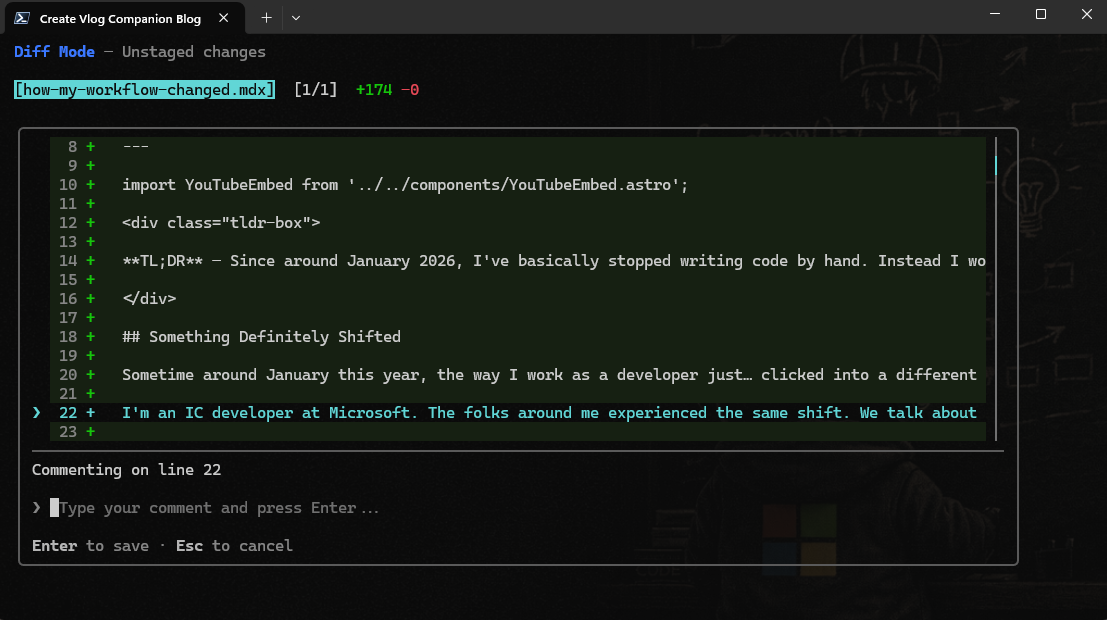
- Local review with the agent: I’ll have the agent review its own code, or I’ll use a dedicated review agent to critique the changes. Copilot CLI has a built-in diff view (
/diff) where you can see what changed and leave inline comments — the agent picks those up and acts on them.
- Team code review: When I’m ready to submit a PR, my teammates do the same thing on their end — they have their agents explain the code, suggest comments, and flag anything that looks off. The human reviewer decides what to post and what to dismiss.
And here’s where the feedback loops kick in. After review, you might need a small nudge (“fix this one comment”), or you might need to go back and execute another phase of the plan, or you might realize the plan itself needs updating. You cycle through until you reach the goal.
How This Maps to Copilot CLI
Each phase of the cycle has a pretty clean mapping to tools I use every day:
| Phase | Copilot CLI Feature | What It Looks Like |
|---|---|---|
| Research | /research command | Give it a topic, get a structured research report |
| Plan | Plan mode (Shift+Tab or /plan) | Agent creates a structured plan with todos before executing |
| Execute | Autopilot mode | Agent works autonomously, runs tools, kicks off builds |
| Nudge | Interactive messages / switching to interactive mode | Quick steering messages mid-flight or queueing a message with Ctrl+q |
| Review | /diff view, review agent, code-review agent | Inline commenting, agent self-review, visual diff |
If the CLI Isn’t Your Thing
I get it — not everyone wants to live in a terminal. If you’re into the idea of agent-driven development but want a GUI, check out VS Code Agents. It’s a new experience that wraps a lot of the same concepts in a graphical interface.
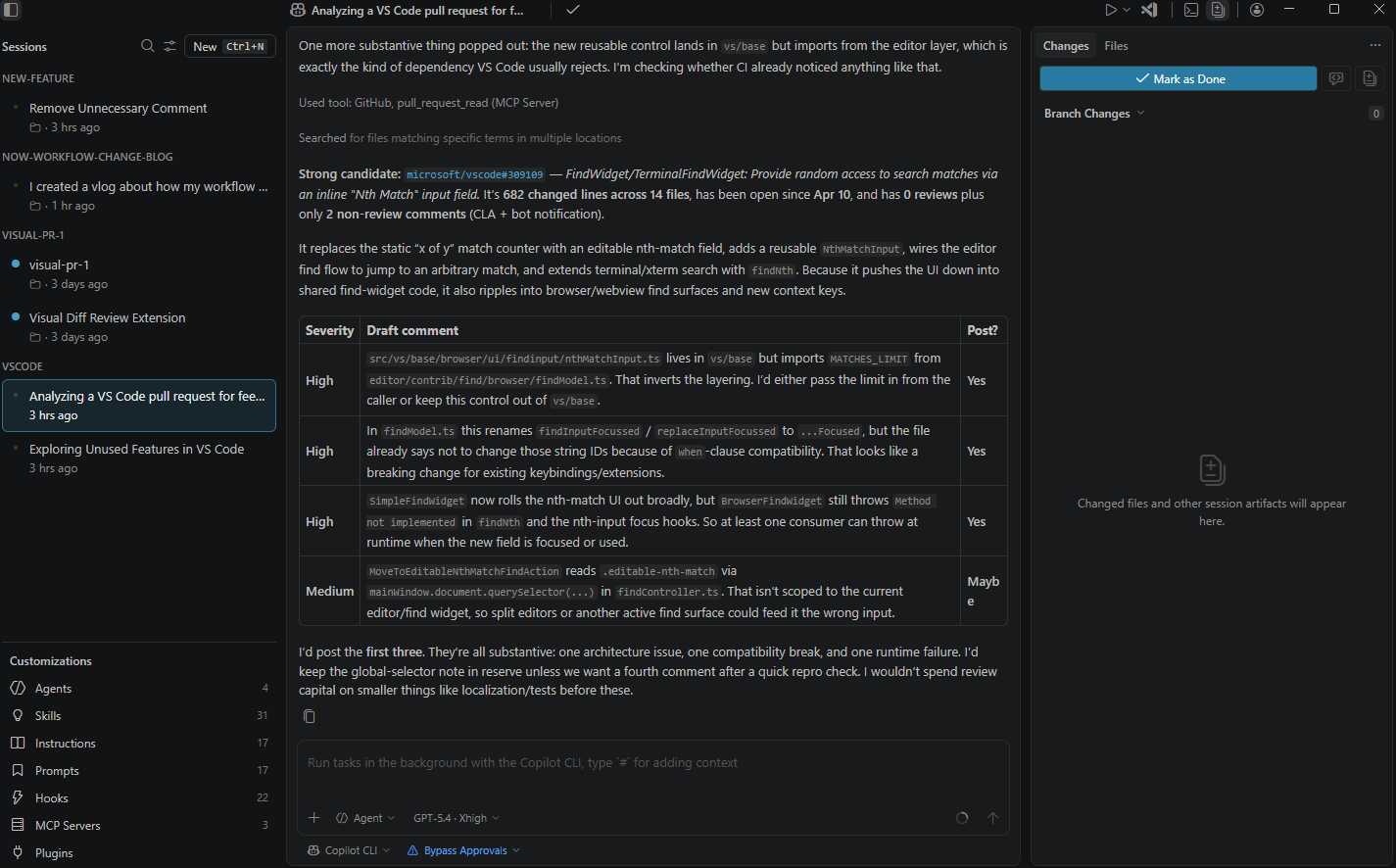
What I like about it: it can set up worktrees for you, connect to existing Copilot CLI sessions (so your CLI and GUI stay in sync), and gives you options for running cloud agents. It also surfaces notifications when a session needs your attention, which is nice when you’re juggling multiple work streams.
Code Reviews Look Different Now
This deserves its own section because it’s one of the biggest changes I’ve noticed on our team.
When I need to review a teammate’s PR, I don’t start by scrolling through the diff. I start by talking to an agent. Something like: “Hey, my teammate has a PR open. Can you pull it up, explain what it’s doing, and then suggest some review comments? Nothing too nitpicky — focus on high-level issues, give each one a severity, and let’s talk through them before posting anything.”
The agent explains the code changes to me, suggests comments with severity levels, and then I use my knowledge of the project to decide which ones actually matter. Sometimes I’ll say “yeah, that’s a really good catch — post it.” Sometimes I’ll say “nah, I know that’s fine in this context, skip it.”
I’m starting to treat code the way we treated assembly in December. It’s there, it does stuff, it’s important — but I’m not really reading every line. Instead, I care about: What tests were added? What validation was done? Were builds run? The agent can pull all of that context from Azure DevOps or GitHub, so I can make informed decisions without reading every file.
This only works if you’ve invested in your CI/CD. More on that in a sec.
Parallel Everything
One of the side effects of this workflow is that waiting becomes productive. When one agent is executing on a task, I can:
- Plan the next work item — So it’s ready to go the moment the current one finishes
- Start another execution — In a separate worktree with a separate agent session
- Do reviews — While waiting for builds or tests
I regularly have multiple terminal tabs open, each with a different worktree and a different Copilot CLI session working on a different task. And because the planning happens up front, I can plan dependent work items in parallel — even if task B depends on task A, I can plan B while A is executing, because the plan is aware of the changes A is making.
It’s front-loading at a level that wasn’t really practical before. You couldn’t write the code for task B before task A’s code existed. But you can plan task B while A is in progress, and then execution becomes near-instant once A lands.
What This Feels Like
OK, personal stuff. When I first started working this way, my brain kind of exploded — in a good way. I’ve been a software engineer for nearly 15 years, and honestly? I was getting to that point where my brain could plan and design things way faster than my hands could type them out. The bottleneck was always execution.
That bottleneck is basically gone now. And it’s incredibly energizing. Ideas that I would have shelved because “I don’t have time to build that” are suddenly viable. I’ve kicked off three parallel spikes on different approaches to the same problem, just to see which one works best. That was never realistic before.
But there’s a flip side. The easy wins evaporate fast. Once agents handle the straightforward stuff, all that’s left are the hard problems. The things that require real creative thinking, deep domain knowledge, careful judgment calls. That’s actually great by design — it means you’re spending more of your time on the work that matters most. But it’s also mentally exhausting. Every day is a hard-problem day now.
The Wooden Sword → Lightsaber Problem
Here’s the metaphor I keep coming back to: AI is like going from a wooden sword to a lightsaber. With a wooden sword, you could accidentally whack yourself a few times and be fine. With a lightsaber, you’re going to have a bad time.
What this means in practice: you have to invest in your infrastructure. CI/CD pipelines, test coverage, validation gates — all of it. If you’re moving faster (and you will be), your guardrails need to be proportionally stronger. We’ve been investing heavily in test quality and build validation so that we can have high confidence in agent-generated code without manually reading every line.
This is something teams should have been doing all along, honestly. AI just makes the consequences of not doing it more immediate.
The Human Cost (The AI Vampire)
Steve Yegge wrote a post called “The AI Vampire” that really resonated with me. He references Colin Robinson from What We Do in the Shadows — an energy vampire who drains people just by being present. Yegge argues that AI tools create a similar dynamic: they enable you to work at 10x speed, but that speed is cognitively and emotionally draining.
The core observation from Steve rings true for me. When you can do more, you feel pressure to do more. The FOMO is 20x worse because there are new techniques, new models, new features dropping constantly, and you feel like you need to stay on top of all of it. You’re driving your team to adopt new practices, you’re making sure you’re adopting them, and you’re trying to bring everyone along.
It’s busier. It’s more stressful in some ways. It’s also more fun and more rewarding in a lot of ways. But I want to be honest about it: there’s a mental health dimension here that’s real. I’ve experienced it. I’ve had to manage it. And I think it’s something our industry needs to talk about more openly.
If you’re feeling the pressure to go faster because the tools let you — take a breath. The tools aren’t going anywhere. You don’t have to optimize every hour of every day. Find your sustainable pace.
Try It
If any of this resonates, here’s my challenge: pick one small task — a bug fix, a config change, whatever — and try the cycle.
- Research: Ask the agent to gather context before you start
- Plan: Describe the goal and constraints. Use plan mode. Define what “done” looks like
- Execute: Let the agent do the work. Don’t touch the code
- Nudge: Steer if needed. Add something you forgot. Course-correct
- Review: Look at the diff. Leave comments. Have the agent address them
See how it feels. The first time might be uncomfortable — you’ll want to jump in and edit a file. Resist that urge. The mindset shift is the whole point.
If you want to go deeper on my terminal setup, worktrees, and how I have all of this organized, check out my previous post: Customize Your Terminal with GitHub Copilot CLI.
Happy coding — or whatever we call it now.